
In a world where surprises are inevitable, your onboarding must be prepared. This guide shows you how to build contingencies that keep onboarding steady—even when disruption strikes.
Why Onboarding Contingency Planning Is Crucial
Your onboarding journey sets the tone for the entire customer lifecycle. It establishes expectations, builds trust, and drives early adoption. But unpredictable problems—software glitches, team burnout, client changes—can derail that journey.
By embedding contingency planning into your onboarding strategy, you gain resilience so that your customer experience doesn’t crumble under pressure. In practice, that means your team is ready to pivot while maintaining consistency and communication.
Key Elements of an Effective Contingency Plan

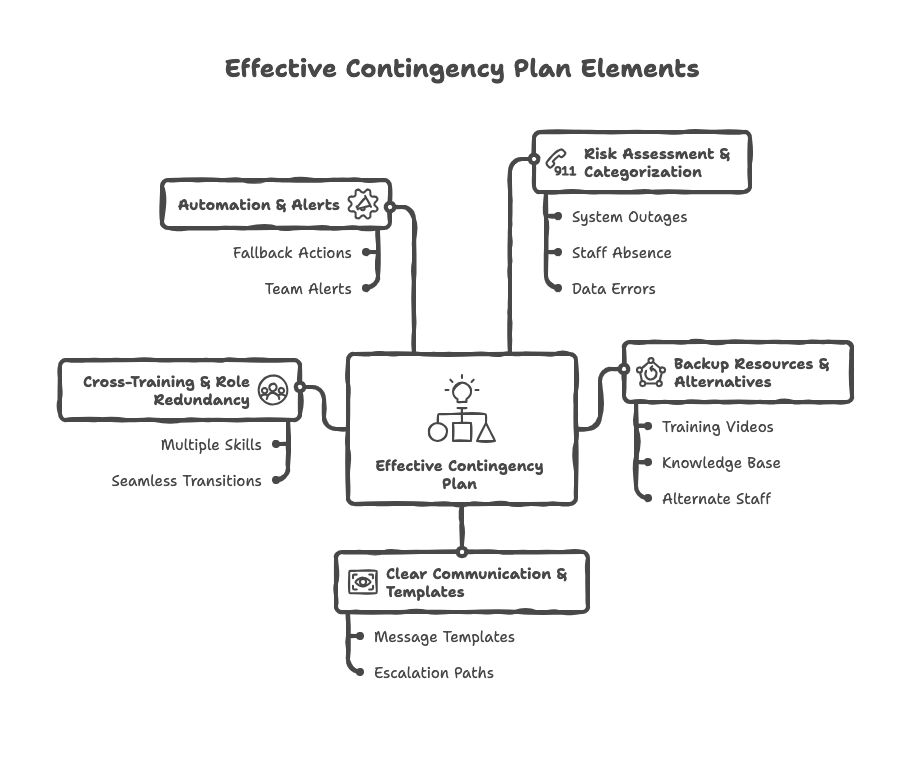
1. Risk Assessment & Categorization
List possible risks, categorize by likelihood and impact. Typical risks include:
- System outages or API failures
- Staff absence, turnover, or bandwidth spikes
- Data migration or import errors
- Client-side delays (decision makers unavailable)
- Communications mishaps (email blocks, spam issues)
2. Backup Resources & Alternatives
- Pre-recorded training videos or webinars
- Self-service knowledge base or LMS content
- Alternate staff or external “onboarding backup team”
- Fallback tools or simplified processes (manual vs automated)
3. Clear Communication & Templates
Create predefined message templates to use in disruptions. Define escalation paths so customers always know who to contact. Transparency builds trust.
4. Cross‐Training & Role Redundancy
Avoid bottlenecks by ensuring multiple people understand each onboarding step—so if one is unavailable, another takes over seamlessly.
5. Automation & Alerts
Leverage your tech stack to trigger fallback actions or alert your team when delays or deviations happen.
Case Study: Slack’s Remote Onboarding Pivot
When the pandemic struck, Slack’s onboarding team had to shift fast. They identified local office leads in each region and trained them to deliver onboarding locally instead of bringing everyone to San Francisco. :contentReference[oaicite:1]{index=1}
Sessions that could be recorded (e.g. legal, compliance) were converted into on-demand video. Core interactive sessions persisted via live video. Slack also created a multi-channel space for Q&A and triage support. :contentReference[oaicite:2]{index=2} The result: onboarding continuity even during global disruption.
Step-by-Step: Building Your Own Onboarding Contingency Plan

- Map your current onboarding process — document each step, owner, and dependencies.
- Brainstorm disruption scenarios — both obvious and unlikely.
- Design fallback workflows — for each risk, prepare an alternative path.
- Assign contingency roles — define who does what in each scenario.
- Run simulations — do drills or tabletop exercises to test readiness.
- Document & share the plan — keep it accessible, versioned, and known.
- Review and revise regularly — risk changes over time, so your plan must evolve.
Technology That Supports Contingent Onboarding
- CRM & Workflow Automations — trigger fallback steps if a client lags behind.
- LMS / Training Portals — allow clients to self-serve in downtime.
- Multi-channel communication — email, chat, SMS, video to ensure redundancy.
- Monitoring & Alerts — dashboards to flag delays or anomalies in onboarding metrics.
Best Practices for CSMs & Team Leads
- Be transparent with customers when issues arise.
- Foster cross-team relationships (Product, IT, Support) to draw resources in emergencies.
- Keep the plan living — update after each disruption or near miss.
- Leverage empathy — understand client pain during the disruption and respond accordingly.
- Balance consistency with flexibility — don’t rigidly force standard flows when contingency is needed.
Frequently Asked Questions (FAQ)
What’s the difference between a backup plan and contingency planning?
A backup plan is a fallback for a specific failure. Contingency planning is a broader framework anticipating many scenarios, with defined responses rather than reactive scrambling.
How often should I test the plan?
At least semiannually, or after any major product change, team restructuring, or disruption event. Tabletop simulations or role play help.
Can small teams do this effectively?
Absolutely. Your “redundancy” might be lighter, but even a few fallback resources (pre-recorded sessions, shared documentation) make a big difference.
How do I communicate contingencies to customers without causing alarm?
Frame it as service quality: “In rare cases, we have backup procedures so your onboarding experience remains smooth. Should any disruption occur, here’s how we’ll respond.” Emphasize it’s proactive, not reactive.
How do I know when to evolve the plan?
When you see repeat near-misses, when your tools or team changes, or after a disruption event. Use post-mortems to refine the plan.
Recommended Links
- Slack’s Remote Onboarding Adjustment
- Dock: High-Touch Onboarding Guide
- Vitally: CS Onboarding Templates
- Zendesk: Customer Success Planning
- UserGuiding: Slack Onboarding Teardown
In today’s volatile environment, your onboarding must be nimble yet trustworthy. When you prepare for what might go wrong, the experience your customers receive remains exceptional—even in uncertainty.
Found this helpful? Subscribe for more deep dives or share your own contingency planning tips below!


Leave a Reply