
Pre-onboarding may seem like a behind-the-scenes step, but its impact is profound. When you collect the right customer data before onboarding begins, you give your team a head start—clearer context, fewer surprises, and greater alignment. In contrast, missing or low-quality data can lead to confusion mid-onboarding, misaligned expectations, and wasted effort.
In this article, I’ll walk you through a robust “pre-onboarding how to” framework: what data to collect, how to collect it reliably, and how to use it. Whether you’re a veteran CSM or building your onboarding playbook, this will sharpen your preparation and make your onboarding smoother from day one.
Why Pre-Onboarding Data Collection Is a Game-Changer

Collecting customer data early gives you a strategic edge:
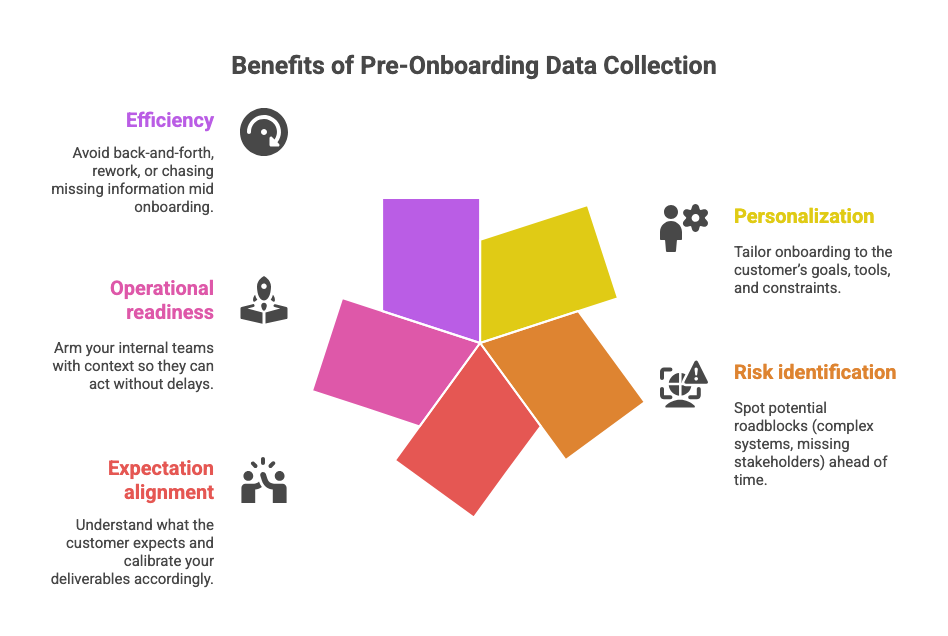
- Personalization: Tailor onboarding to the customer’s goals, tools, and constraints.
- Risk identification: Spot potential roadblocks (complex systems, missing stakeholders) ahead of time.
- Expectation alignment: Understand what the customer expects and calibrate your deliverables accordingly.
- Operational readiness: Arm your internal teams with context so they can act without delays.
- Efficiency: Avoid back-and-forth, rework, or chasing missing information mid onboarding.
In fact, well-executed pre-onboarding often separates high-performing onboarding teams from the rest.
Pre Onboarding “How To”: Step-by-Step Guide to Collect Customer Data
Below is a practical, sequential guide to gathering the data you need before onboarding begins.
1. Define What Customer Data You Need
Before you ask, decide. Without clarity, you’ll collect noise. Key data categories often include:
- Contact & company info: names, emails, phone, roles, company size
- Business goals & success metrics: what outcomes they aim for
- Technical environment: systems, integrations, APIs, existing architecture
- User roles & stakeholders: who will use the product, decision-makers, admins
- Past experience & challenges: prior solutions, pain points, traded-off features
- Preferred communication style: calls, emails, chat; frequency & expectations
Write these as “data fields” with purpose: each item should map to how you’ll use it during onboarding.
2. Choose the Right Data Collection Methods
Mix methods to reduce friction and maximize completeness:
- Onboarding surveys / forms: Google Forms, Typeform, or your own form; keep it short but well-scoped.
- Kickoff or discovery calls: Use a structured questionnaire to probe deeper and clarify responses.
- CRM & sales handoff data: Pull in information already collected during sales.
- Customer self-service portal: Let customers fill in or update information directly.
- Pre-onboarding check-ins / polls: Use quick micro-surveys before formal onboarding starts.
Blend one automated + one human method to balance efficiency and depth.
3. Establish Data Validation & Quality Checks
Bad data can be worse than no data. Incorporate quality controls:
- Enforce input validation in forms (e.g. required fields, proper email formats).
- Use dropdowns or controlled options where possible (to avoid free-text ambiguity).
- Set up automated reminders or nudges for unfinished or missing responses.
- Cross-reference data from multiple sources for consistency (sales, form, call notes).
- Flag anomalies or conflicting answers for manual review.
These steps reduce surprises later and ensure your onboarding levers work with clean inputs.
4. Communicate Value & Maintain Transparency
Customers are more willing to share information when they trust what you’ll do with it. Be explicit about:
- Why you need the data: Explain how it enables better, faster onboarding.
- Privacy & security: Assurance of how their data is stored, used, and protected (GDPR, etc.).
- Control: Let them know they can update or remove their data later.
This transparency fosters goodwill, reduces hesitancy, and increases response rates.
Leveraging Collected Data for Smoother Onboarding
Once you’ve collected clean, validated data, here’s how to use it to supercharge onboarding:
Segment Your Customers for Tailored Paths
Use collected attributes (industry, goals, tech stack) to classify clients into tiers or tracks. This allows you to:
- Offer differentiated onboarding journeys (enterprise path, standard path, etc.)
- Customize training, resources, and check-ins based on needs
- Assign different success metrics or milestones
Prepare Your Team Internally
Share data insights with your Customer Success, engineering, support, and implementation teams so they’re ready before onboarding kickoff:
- Brief them on the customer goals, technical constraints, and expectations
- Tailor the first demo or walkthrough based on their setup
- Preempt likely challenges (if customer uses system X, expect integration issues, etc.)
- Ensure accountability and role clarity referencing the data
Automate & Streamline Data-Driven Workflows
Use the data fields to drive personalized and proactive onboarding workflows:
- Send welcome emails or resource recommendations based on industry or use case
- Trigger internal tasks automatically (e.g. “setup API” step becomes active when customer indicates use of API)
- Schedule check-ins or reviews according to customer readiness or segment
- Use dynamic templates that read data fields (e.g. “Hello [Role], here’s your admin guide”)
Common Challenges & How to Overcome Them
Even with the best process, you’ll run into obstacles. Here’s how to handle them:
- Low response rate: Keep forms short, explain why you’re asking, and offer incentives or show immediate value.
- Inaccurate or incomplete data: Use validation rules and cross-check responses.
- Privacy concerns: Emphasize security, compliance standards, and customer control over their data.
- Burden on internal teams: Stage the collection process, assign clear ownership, and automate where possible.
Conclusion: Laying a Strong Foundation Through Data
Pre-onboarding data collection isn’t a mere checkbox—it’s the scaffolding upon which your onboarding success is built. When done well, it empowers personalization, reduces friction, aligns expectations, and arms your teams ahead of launch.
Start by defining precisely what data you need, picking the right mix of collection methods, validating inputs, and communicating transparently. Use that data to segment, prepare internally, and automate workflows. Over time, refine your approach as you learn.
If you found these strategies useful, subscribe for more Customer Success playbooks. Share your experiences or challenges with pre-onboarding data collection in the comments below—I’d love to help you fine-tune them.
FAQs
- Q: How many data fields should I ask for in pre-onboarding?
- A: It depends on your onboarding complexity, but aim for 8–12 core fields. More than that risks drop-off, less may miss critical context.
- Q: Should I rely only on forms, or calls too?
- A: Use both. Start with a concise form for structured data, and supplement with calls to clarify, probe deeper, and build rapport.
- Q: What if customers refuse to provide certain data?
- A: Prioritize only what is absolutely necessary. Explain the benefit, and let them opt-out of optional fields.
- Q: How often should I review or update collected data?
- A: At least before onboarding begins, and then periodically (e.g. quarterly) to refresh stale info.
- Q: Can I automate this collection process fully?
- A: You can automate much, but human review and backup methods are still valuable for nuance, edge cases, and trust-building.
Call to Action
If this article sharpened your thinking, share it with your onboarding team or leadership. Try building your next pre-onboarding survey using these steps, and comment below on what extra fields you find useful. Subscribe to get more tactics for scalable, smooth onboarding journeys.



Leave a Reply